Iphone Photo Library Cat Grid
Prompt
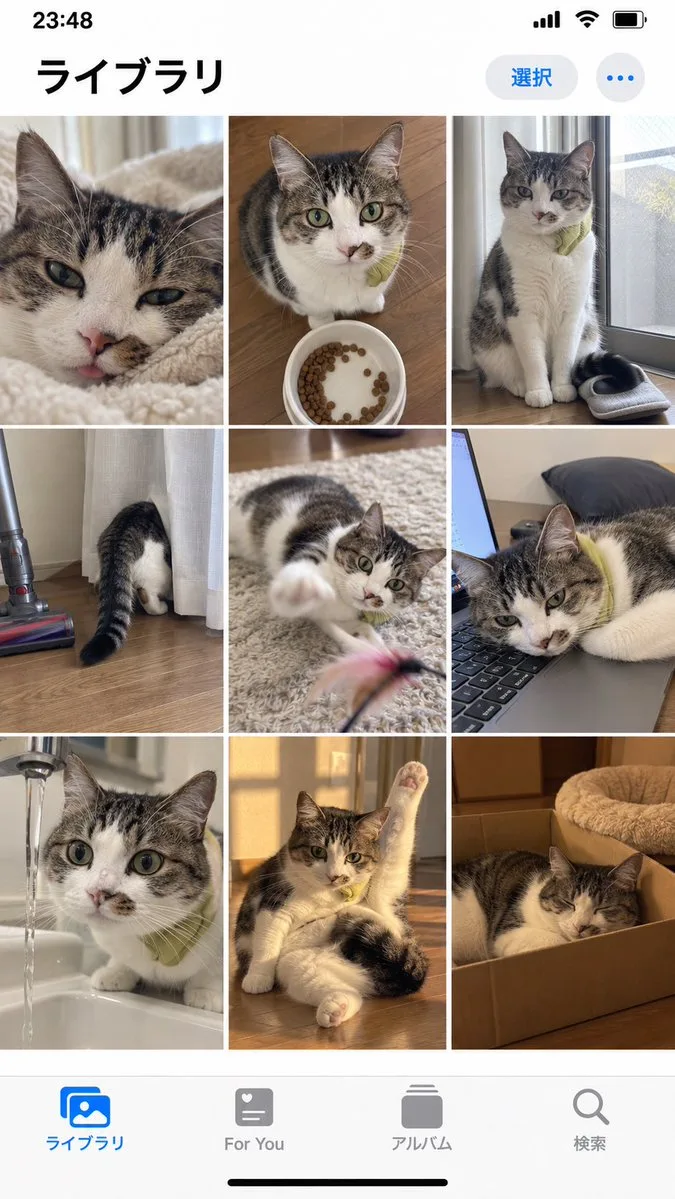
Goal: Create a realistic iPhone photo library screenshot featuring a grid of cat photos. Canvas: Vertical mobile aspect ratio (9:16) mimicking an iOS interface. Layout: A standard iOS status bar at the top, a header with Japanese text, a 3x3 grid of square images in the center, and a bottom navigation bar with four icons. Sections: - Top Bar: Status bar showing time '23:48', signal bars, wifi icon, and battery. Below that, a large bold title on the left reading 'ライブラリ' (Library). On the right, a blue pill-shaped button reading '選択' (Select) and a three-dot menu icon. - Image Grid: Nine distinct photos arranged in a 3x3 grid. All photos feature the same tabby and white cat wearing a small green collar or bib. - Row 1: Close-up of face licking nose; sitting next to a food bowl; sitting by a window looking down. - Row 2: Butt sticking out from behind a curtain; playing with a feather toy; lying head-down on a laptop keyboard. - Row 3: Drinking water from a faucet; stretching one paw up while lying down; sleeping inside a cardboard box. - Bottom Bar: Four navigation icons with labels below them. Left to right: Blue 'Photos' icon labeled 'ライブラリ' (Library), grey heart icon labeled 'For You', grey stack icon labeled 'アルバム' (Albums), grey magnifying glass labeled '検索' (Search). Visual style: Photorealistic UI mockup. The photos within the grid should look like high-quality amateur pet photography—natural lighting, slightly candid angles, warm tones. Text content: Preserve all Japanese text exactly as described in the layout sections.